
Reference
Settings and memory modes
Editor Preferences of the plugin and how to trade memory for speed.
Edit > Editor Preferences > Plugins > Text To Anim. The settings are per user and shared by all your projects.
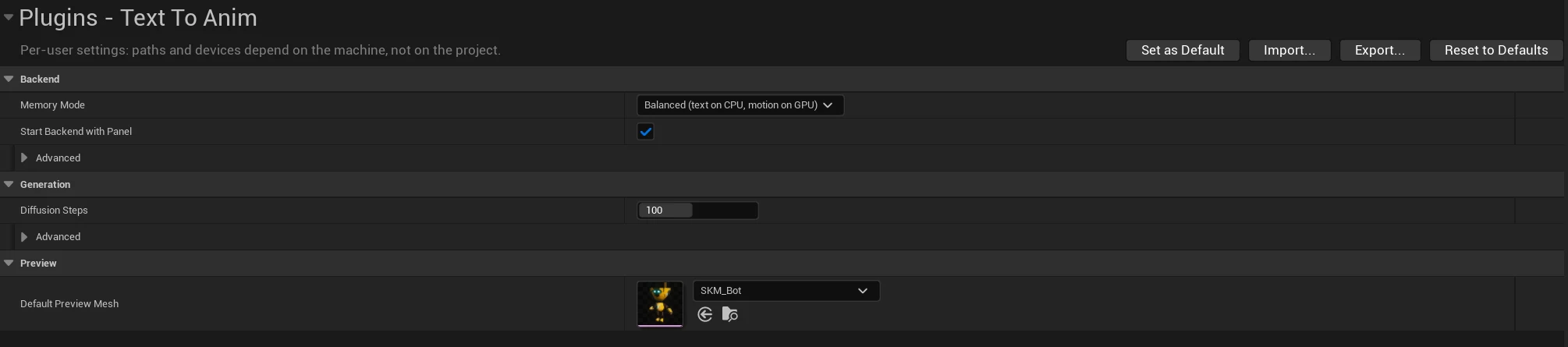
Memory mode
| Memory mode | Text encoder | Motion model | Speed (RTX 4080, 5 s clip) |
|---|---|---|---|
| Balanced (default) | CPU, ~8 GB RAM | GPU, ~1.5 GB VRAM | 3–4 s |
| Performance | GPU | GPU, ~9 GB VRAM in total | 2.5–3.5 s |
| Low memory | GPU, streamed layer by layer | GPU, ~2 GB VRAM | ~10 s |
| CPU only | CPU | CPU | minutes |
Balanced leaves almost all the graphics memory to the editor. Use Performance on GPUs with 12 GB or more
when the editor itself needs little VRAM, Low memory on machines with 16 GB of RAM.
Restart the model (Stop Model, Start Model in the panel) after changing it.
Other settings
| Setting | Meaning |
|---|---|
| Start Backend With Panel | Load the model as soon as the Text To Anim panel opens. |
| Models Directory (Advanced) | Where the models are; empty = %LOCALAPPDATA%\TextToAnim\Models. |
| Diffusion Steps | Quality/speed trade-off of the motion model (default 100). |
| Output Directory (Advanced) | Where raw generations are kept (default Saved/TextToAnim/Generations of the project). |
| Default Preview Mesh | Character used for the preview when an asset has none. |